
前言
以前觉得阿里云的OSS当图床非常的适合,配合CDN更是爽,博主更喜欢的是它提供了动态URL添加图片水印功能,适合一图多站点使用,通过不同的URL参数使用不同的水印,直到被5分钟刷了三千多费用后,博主回归了自建图床,使用简单图床虽然可以设置上传图片添加水印,但没办法实现一张图多用,像博主多个网站的,就要每个网站建一个图床,费事费空间,还不好管理
思路
由于简单图床是开源项目,可以二次开发,就把这个思路让AI跑了一下,都不用几分钟就跑通了,今天分享出来,有需要的朋友可以直接拿去用
效果
原图:https://img.mailberry.com.cn/i/2026/easyimageURLwatermark.webp
URL参数:?x-oss-process=image/watermark,text_TWFpbEJlcnJ5LmNvbS5jbg,type_ZmFuZ3poZW5naGVpdGk,size_18,shadow_50,t_70,g_se,x_10,y_10,color_ffffff
效果图:

参数含义:
text_      水印base64代码
size_18        字号 18
 shadow_50      阴影透明度 50
 t_70           文字透明度 70
 g_se           右下角
 x_10           距右边 10px
 y_10           距底部 10px
 color_ffffff   白色
更多参数请参考阿里云说明文档
https://help.aliyun.com/zh/oss/user-guide/add-watermarks
实现
第一步,创建一个PHP文件
路径和文件名/app/oss-process.php
复制代码
<?php
/**
 * EasyImages2.0 动态水印处理
 * 用法:
 * /picgo/2024/04/a.jpg?x-oss-process=image/watermark,text_TWFpbEJlcnJ5LmNvbS5jbg,size_18,t_70,g_se,x_10,y_10,color_ffffff
 */

error_reporting(0);

define('APP_ROOT', dirname(__DIR__));

$img = isset($_GET['img']) ? $_GET['img'] : '';
$process = isset($_GET['x-oss-process']) ? $_GET['x-oss-process'] : '';

if (!$img || !$process) {
    http_response_code(400);
    exit('Bad Request');
}

// 只允许站内图片,防止任意文件读取
$img = parse_url($img, PHP_URL_PATH);
$img = urldecode($img);
$img = '/' . ltrim($img, '/');

$realPath = realpath(APP_ROOT . $img);
$rootPath = realpath(APP_ROOT);

if (!$realPath || strpos($realPath, $rootPath) !== 0 || !is_file($realPath)) {
    http_response_code(404);
    exit('Image Not Found');
}

$ext = strtolower(pathinfo($realPath, PATHINFO_EXTENSION));
$allow = ['jpg', 'jpeg', 'png', 'webp'];

if (!in_array($ext, $allow)) {
    http_response_code(415);
    exit('Unsupported Image Type');
}

// 解析 x-oss-process
$params = parseOssProcess($process);

$text = isset($params['text']) ? base64url_decode($params['text']) : 'MailBerry.com.cn';
$text = trim($text);
$text = mb_substr($text, 0, 60, 'UTF-8');

$size = isset($params['size']) ? intval($params['size']) : 18;
$opacity = isset($params['t']) ? intval($params['t']) : 70;
$gravity = isset($params['g']) ? strtolower($params['g']) : 'se';
$x = isset($params['x']) ? intval($params['x']) : 10;
$y = isset($params['y']) ? intval($params['y']) : 10;
$color = isset($params['color']) ? preg_replace('/[^0-9a-fA-F]/', '', $params['color']) : 'ffffff';
$shadow = isset($params['shadow']) ? intval($params['shadow']) : 0;

$size = max(8, min($size, 120));
$opacity = max(0, min($opacity, 100));
$x = max(0, min($x, 1000));
$y = max(0, min($y, 1000));
$shadow = max(0, min($shadow, 100));

// 字体文件:可换成你自己的中文字体
$font = APP_ROOT . '/public/static/fonts/fangzhengheiti.ttf';

// 没有字体就用 DejaVuSans 兜底,Linux 常见
if (!is_file($font)) {
    $font = '/usr/share/fonts/truetype/dejavu/DejaVuSans.ttf';
}

if (!is_file($font)) {
    http_response_code(500);
    exit('Font Not Found');
}

// 缓存,避免每次都生成
$cacheDir = APP_ROOT . '/i/cache/oss-process/';
if (!is_dir($cacheDir)) {
    mkdir($cacheDir, 0755, true);
}

$cacheKey = md5($realPath . '|' . filemtime($realPath) . '|' . $process);
$cacheFile = $cacheDir . $cacheKey . '.' . $ext;

if (is_file($cacheFile)) {
    outputImage($cacheFile, $ext);
    exit;
}

$image = openImage($realPath, $ext);
if (!$image) {
    http_response_code(500);
    exit('Image Open Failed');
}

imagealphablending($image, true);
imagesavealpha($image, true);

$width = imagesx($image);
$height = imagesy($image);

$rgb = hexToRgb($color);
$alpha = 127 - round($opacity * 127 / 100);
$textColor = imagecolorallocatealpha($image, $rgb[0], $rgb[1], $rgb[2], $alpha);

// 计算文字大小
$box = imagettfbbox($size, 0, $font, $text);
$textWidth = abs($box[2] - $box[0]);
$textHeight = abs($box[7] - $box[1]);

list($posX, $posY) = getPosition($gravity, $width, $height, $textWidth, $textHeight, $x, $y);

// 阴影
if ($shadow > 0) {
    $shadowAlpha = 127 - round($shadow * 127 / 100);
    $shadowColor = imagecolorallocatealpha($image, 0, 0, 0, $shadowAlpha);
    imagettftext($image, $size, 0, $posX + 1, $posY + 1, $shadowColor, $font, $text);
}

// 文字水印
imagettftext($image, $size, 0, $posX, $posY, $textColor, $font, $text);

saveImage($image, $cacheFile, $ext);
imagedestroy($image);

outputImage($cacheFile, $ext);
exit;


function parseOssProcess($process)
{
    $result = [];

    $process = trim($process);

    if (strpos($process, 'image/watermark,') === 0) {
        $process = substr($process, strlen('image/watermark,'));
    }

    $parts = explode(',', $process);

    foreach ($parts as $part) {
        $pos = strpos($part, '_');
        if ($pos === false) {
            continue;
        }

        $key = substr($part, 0, $pos);
        $value = substr($part, $pos + 1);

        $result[$key] = $value;
    }

    return $result;
}

function base64url_decode($data)
{
    $data = str_replace(['-', '_'], ['+', '/'], $data);
    $pad = strlen($data) % 4;

    if ($pad) {
        $data .= str_repeat('=', 4 - $pad);
    }

    return base64_decode($data);
}

function hexToRgb($hex)
{
    $hex = ltrim($hex, '#');

    if (strlen($hex) === 3) {
        $hex = $hex[0] . $hex[0] . $hex[1] . $hex[1] . $hex[2] . $hex[2];
    }

    if (strlen($hex) !== 6) {
        $hex = 'ffffff';
    }

    return [
        hexdec(substr($hex, 0, 2)),
        hexdec(substr($hex, 2, 2)),
        hexdec(substr($hex, 4, 2)),
    ];
}

function getPosition($gravity, $imgW, $imgH, $textW, $textH, $x, $y)
{
    switch ($gravity) {
        case 'nw':
            $posX = $x;
            $posY = $y + $textH;
            break;

        case 'n':
            $posX = intval(($imgW - $textW) / 2);
            $posY = $y + $textH;
            break;

        case 'ne':
            $posX = $imgW - $textW - $x;
            $posY = $y + $textH;
            break;

        case 'w':
            $posX = $x;
            $posY = intval(($imgH + $textH) / 2);
            break;

        case 'center':
        case 'c':
            $posX = intval(($imgW - $textW) / 2);
            $posY = intval(($imgH + $textH) / 2);
            break;

        case 'e':
            $posX = $imgW - $textW - $x;
            $posY = intval(($imgH + $textH) / 2);
            break;

        case 'sw':
            $posX = $x;
            $posY = $imgH - $y;
            break;

        case 's':
            $posX = intval(($imgW - $textW) / 2);
            $posY = $imgH - $y;
            break;

        case 'se':
        default:
            $posX = $imgW - $textW - $x;
            $posY = $imgH - $y;
            break;
    }

    return [max(0, $posX), max($textH, $posY)];
}

function openImage($file, $ext)
{
    switch ($ext) {
        case 'jpg':
        case 'jpeg':
            return imagecreatefromjpeg($file);

        case 'png':
            return imagecreatefrompng($file);

        case 'webp':
            if (function_exists('imagecreatefromwebp')) {
                return imagecreatefromwebp($file);
            }
            return false;
    }

    return false;
}

function saveImage($image, $file, $ext)
{
    switch ($ext) {
        case 'jpg':
        case 'jpeg':
            imagejpeg($image, $file, 90);
            break;

        case 'png':
            imagepng($image, $file, 6);
            break;

        case 'webp':
            imagewebp($image, $file, 90);
            break;
    }
}

function outputImage($file, $ext)
{
    $mime = [
        'jpg' => 'image/jpeg',
        'jpeg' => 'image/jpeg',
        'png' => 'image/png',
        'webp' => 'image/webp',
    ];

    header('Content-Type: ' . $mime[$ext]);
    header('Cache-Control: public, max-age=31536000');
    header('Last-Modified: ' . gmdate('D, d M Y H:i:s', filemtime($file)) . ' GMT');

    readfile($file);
}
字体文件“fangzhengheiti.ttf” 可以更换自己喜欢的,不上传也会兜底。
第二步,添加伪静态
我使用的是宝塔面板
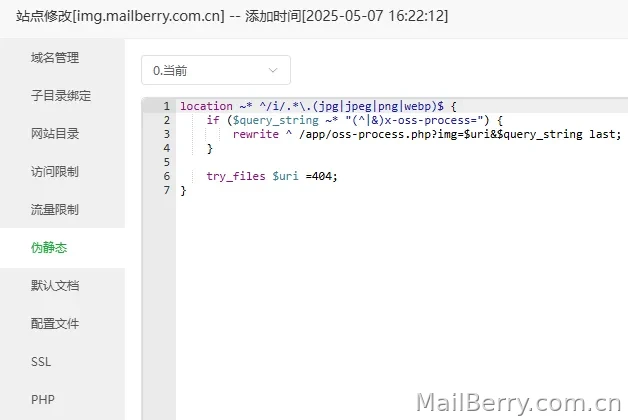
代码
location ~* ^/i/.*\.(jpg|jpeg|png|webp)$ {
    if ($query_string ~* "(^|&)x-oss-process=") {
        rewrite ^ /app/oss-process.php?img=$uri&$query_string last;
    }

    try_files $uri =404;
}
如果没有使用面板的,可以直接修改nginx
第三步,上传工具添加自动化(可选)
上传同具不同,设置可能有出入,但大体上是一样的,博主用的 免灵图床Plus
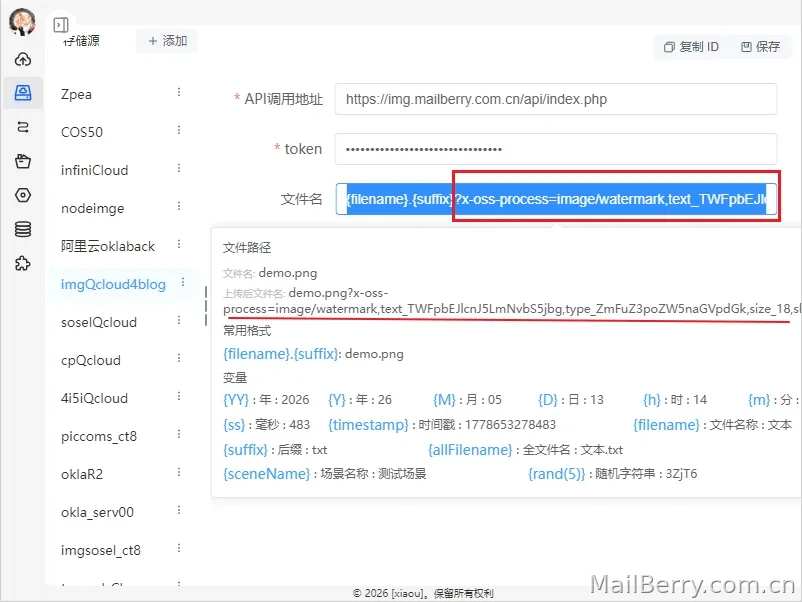
在文件名后面加上URL参数,也可以直接替换法。
总结
只要简单两步,在APP目录创建一个PHP文件,添加一个伪静态,最后在上传工具加上参数或者直接替换法,以后就可以统一使用一个图床,只需要修改链接就有不同的水印了




暂无评论